
Less waiting. More doing.
Connect to the Neurai network without downloading the entire blockchain. A lightweight wallet that gets out of your way.
A simple, lightweight wallet for the Neurai network.
Send, receive, and manage your XNA — with full control, always.
Neurai is a network of possibilities. Your wallet should make them easier to reach — not stand in the way. Electrum Neurai brings the trusted lightweight Electrum approach to the Neurai ecosystem: no full blockchain download, no unnecessary complexity. Just you, your keys, and the network.
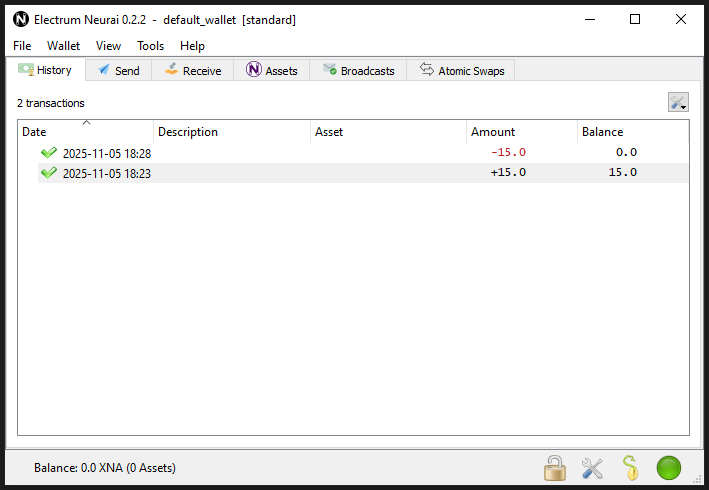
The default wallet view — balance, transaction history and assets on one screen.
A full node keeps the entire blockchain on your machine and syncs it before you can do anything. Electrum Neurai verifies transactions against the network instead. Here is what that changes in practice.
| Full node | Electrum Neurai | |
|---|---|---|
| Blockchain data | A full copy on disk, growing every day | None — no chain data stored locally |
| Time to first payment | Hours or days of syncing | Under a minute |
| Hardware | A dedicated, always-on machine | Any Windows, macOS or Linux desktop |
| Maintenance | Node upkeep, indexing, occasional resyncs | Nothing to maintain |
| Best suited for | Verifying and serving the network | Everyday sending, receiving and assets |
A full node is still the strongest way to verify the network yourself. Electrum Neurai is built for everyday use.
Six things that work from the first day — nothing to switch on.
Connect to the Neurai network without downloading the entire blockchain. A lightweight wallet that gets out of your way.
Keep control of your private keys. Your recovery phrase belongs to you — not to a third party.
Send, receive, and manage native Neurai assets alongside your XNA, all from one wallet.
Protect your wallet with password encryption, offline key storage, and multisignature support.
Public code. Transparent development. Explore the source, review changes, and contribute to the project.
A familiar wallet experience on Windows, macOS, and Linux. Choose your platform and get started.
Choose your operating system. Connect to Neurai.

For your Windows desktop
Get the installer
For your Linux desktop
Get the AppImage
For your Mac
Get the disk imageDownload from the official 0.2.2 release on the project’s GitHub releases page.
All downloads & release informationClear answers about installing, securing and using Electrum Neurai.
Electrum Neurai is an open-source, lightweight desktop wallet for the Neurai (XNA) network, based on the proven Electrum codebase. It lets you send, receive and store XNA and Neurai assets without running a full node.
Yes. The wallet is free and open source. You only pay the standard network fee when you broadcast a transaction.
Download only from the official release page linked on this site. Verify the file name and, where available, the checksum or signature before installing. Never install wallet builds shared in chats or ads.
Official releases are available for Windows, macOS and Linux. Check the release notes for current versions and requirements.
You do. Electrum Neurai is non-custodial: keys are generated and encrypted on your device and never sent to a server.
It is a list of words that can restore your whole wallet. Write it on paper, keep it offline and never share it. Anyone who has it can spend your funds.
Install Electrum Neurai, choose “I already have a seed”, enter your recovery phrase and set a new password. Your balance and history sync from the network.
The password only encrypts the local wallet file. Restore the wallet from your seed phrase and choose a new password. Without the seed, funds cannot be recovered.
No. Electrum Neurai uses SPV and connects to Electrum servers, so it syncs in seconds and stores no blockchain data locally.
Yes. Besides XNA, you can view, send and receive Neurai assets directly from the wallet.
Transactions confirm when they are included in a block. Check your connection to a server and the fee used; the transaction ID can be looked up in a Neurai block explorer.
Start with the documentation, open an issue on the official GitHub repository or ask the Neurai community. Real support will never ask for your seed phrase.